# IPv6-Lab
## Initial situation
In this project, a laboratory for IPv6 will be set up using a desktop computer with a current Debian system. To use the computer furthermore for its actual purpose, this should be done as far as possible without stirring up a lot of dust (e.g. using various outdated network backends).
OS: Debian GNU/Linux 12
Kernel: 6.1.0-18-amd64
Network backend: NetworkManager
Hypervisor: KVM
Virtual switch: Open vSwitch 3.1.0
## Required packages
- openvswitch-switch
- gvncviewer
## Network topology
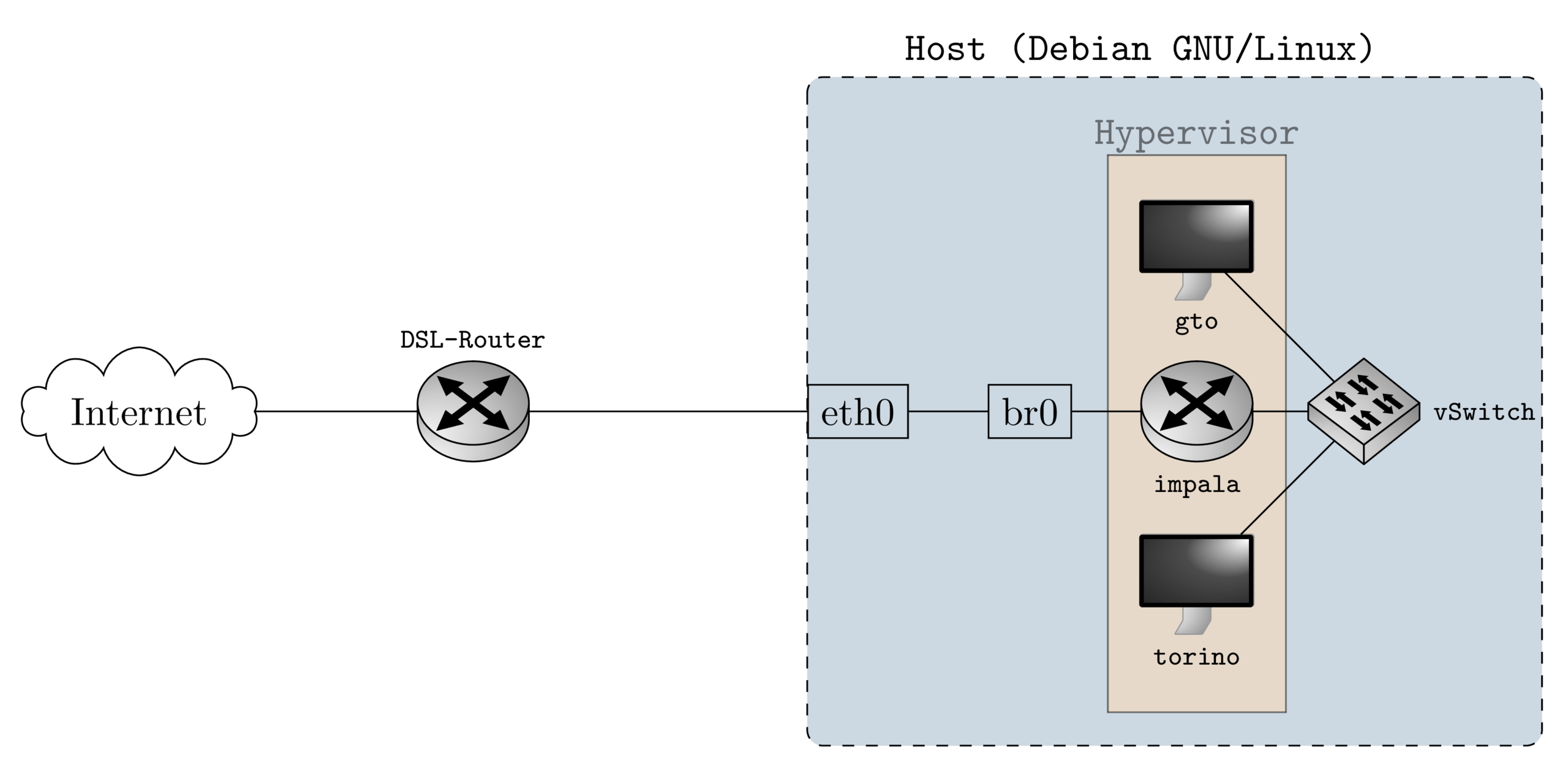
### Configuring Systems
## Bridge br0
The bridge is part of the host system. Thus, it is configured using the network manager command line tool. These settings will be permanent.
Info about current connetions
# nmcli con show
Add bridge
# nmcli con add type bridge ifname labBridge0
Add interface to the bridge
# nmcli con add type bridge-slave ifname wlp4s0 master labBridge0
Turn on the bridge
# nmcli con up bridge-labBridge0
## Hypervisor
KVM is used as a hypervisor in this project. You may use virsh on the cli or virt-manager as a graphical tool.
### Create virtual networks on hypervisor
Here we create two networks on the hypervisor. The first is used by the edge router impala to connect to the host network, the second is needed by the hosts in the lab network. Create a file named bridged-network.xml with the following content
bridged-network
Then we need the network for the virtual switch served by openvswitch. Create a file named ovs-network.xml with this content
vSwitch0
In case you use virsh, you need to run the following commands to create the network on the hypervisor:
$ virsh net-define bridged-network.xml
$ virsh net-define ovs-network.xml
Then start it
$ virsh net-start bridged-network
$ virsh net-start vSwitch0
$ virsh net-autostart bridged-network
$ virsh net-autostart vSwitch0
$ virsh net-list
Name Status Automatischer Start Bleibend
------------------------------------------------------------
bridged-network Aktiv ja ja
vSwitch0 Aktiv ja ja
On the hosts torino, we need just one interface connected to vSwitch0.
## Torino
Torino is the WAN router of the lab. On the external interface torino acts as a DHCPv6 client in order to receive a Prefix Delegation from the DSL-Router (Fritz!Box in this case). On the internal interface torino will serve Router Advertisements which is necessary for SLAAC. The hosts in the lab environment connectetd to the vSwitch will receive a prefix via SLAAC this way.
### DHCP Client
The dhcpcd package has to be installed on the OpenBSD system.
# pkg_add dhcpcd
# rcctl enable dhcpcd
Edit the config file /etc/dhcpcd.conf
ipv6only
noipv6rs
script ""
allowinterfaces vio0 vio1
interface vio0
ipv6rs
ia_pd 1 vio1/1